

What Makes an AI Reporting Dashboard Useful for Modern Businesses?
Key Takeaway
- An AI reporting dashboard is useful when it helps people make better decisions, not simply when it displays more data.
- The most effective dashboards are built around specific business questions and decisions, rather than every metric a company can collect.
- AI adds real value when it turns complex data into plain-language insights and highlights what has changed, why it matters, and what needs attention.
- Trust is essential: accurate, transparent, consistently updated data matters more than a polished interface.
- A useful dashboard doesn’t need dozens of metrics. A small set of meaningful numbers, accessible when and where people need them, is more likely to become part of the team’s routine.
Introduction

Plenty of businesses have a reporting dashboard sitting somewhere, quietly updating itself, that nobody has actually opened in weeks. It’s because most dashboards, including plenty labelled “AI-powered,” were built to display what data was available rather than what a specific person actually needed to know to make a decision. This guide is about the difference between the two and what specifically makes a reporting dashboard genuinely useful rather than just technically functional.
It’s worth being upfront that this isn’t a minor design nuance. The gap between a dashboard that gets used and one that gets built, admired once, and then quietly ignored is one of the most consistent and well-documented patterns in business software, and it holds true regardless of how advanced the underlying technology is. Understanding why it happens is the fastest way to avoid becoming another data point in that pattern.
If you’re still deciding which platform to buy in the first place, our guide on choosing an AI-powered reporting platform covers the evaluation criteria for that decision. This one assumes you’ve got a dashboard, or are about to, and is entirely about what determines whether it actually earns a place in your weekly routine.
Why So Many Dashboards Go Unused?
This isn’t a minor issue affecting a few unlucky businesses. Industry research tracked over several years has found that up to 90% of business intelligence dashboards go unused within six months of deployment, with only around 16% of organizations achieving what’s considered full dashboard adoption. Notably, this pattern holds across major platforms and hasn’t meaningfully improved even as the underlying technology has gotten more sophisticated, which points to the cause being something other than the software itself.
The most common explanation in this research is straightforward: dashboards get built around whatever data was easiest to connect, not around the specific, recurring questions someone in the business actually needs answered. A user opens it once, doesn’t find what they needed, and doesn’t come back. Adding AI to the same underlying pattern doesn’t fix it automatically.
How to Build an AI Reporting Dashboard People Actually Use

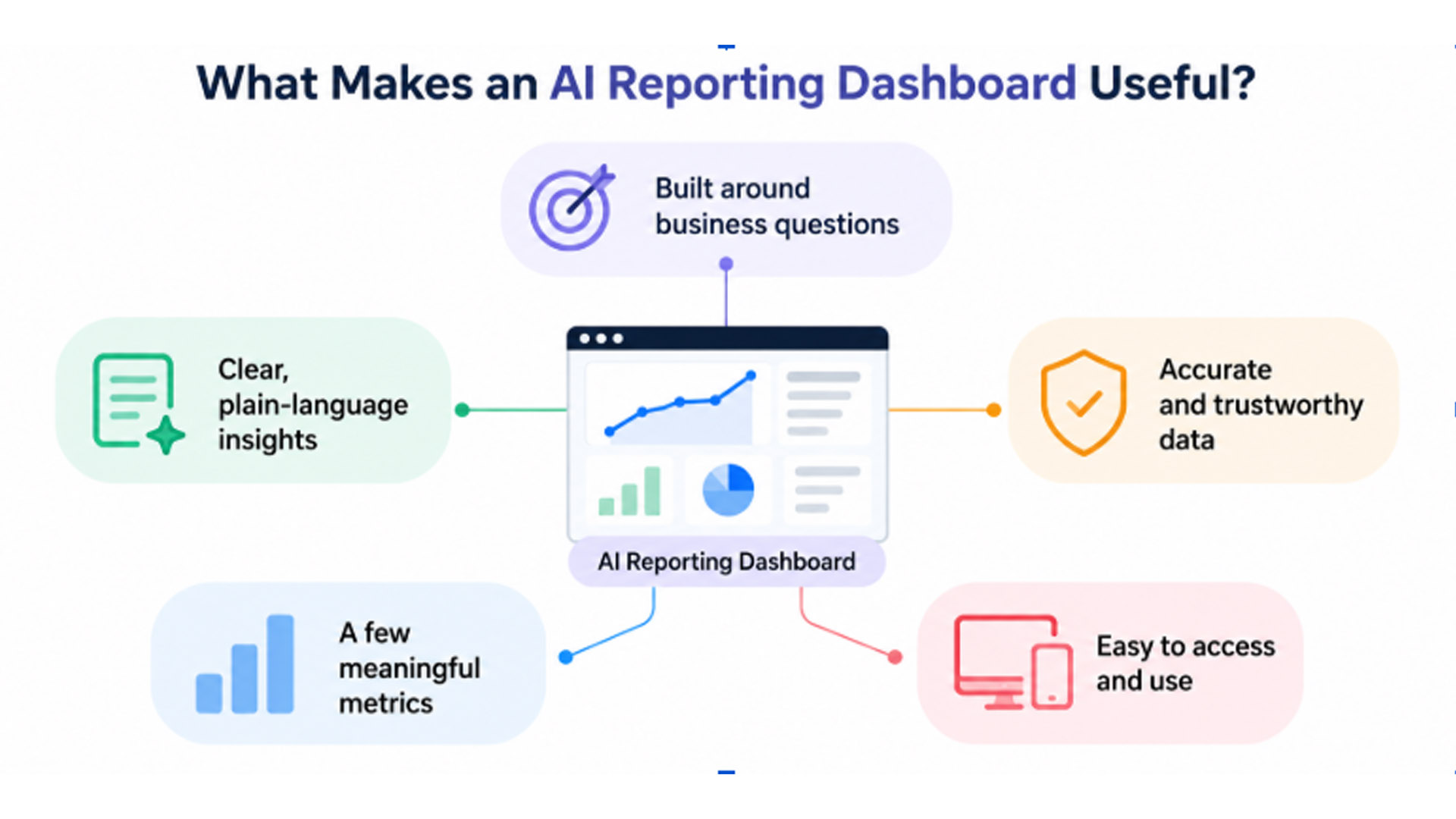
1. Build Dashboards Around Business Questions, Not Data
The single biggest factor separating a dashboard that gets used from one that doesn’t is what it was actually built around. A dashboard built by asking “what data do we have access to” tends to produce a wall of charts covering everything measurable, most of which nobody consistently needs. A dashboard built by asking “What decision does someone need to make every week, and what would they need to see to make it well?” produces something far narrower and far more likely to actually get opened.
This sounds like a subtle distinction, but it changes almost everything about the result. A retail owner doesn’t need a chart of every metric their POS system can produce. They need to know, in a sentence, whether this week looked normal, and if not, why. That’s a completely different design goal than “display all available sales data,” even though both might draw from the exact same underlying numbers.
2. Make Insights Easier to Understand
A useful AI reporting dashboard does more than turn data into charts. It explains what the data means.
For example, a chart might show that sales for a particular product dropped in the third week. But a useful dashboard should go one step further and explain that sales fell 12%, largely because the product experienced a stock shortage during the same period.
That difference matters. A chart requires someone to spot the change, investigate it, and work out why it happened. A plain-language insight gives them the finding immediately. For a busy business owner, that can be the difference between checking a dashboard regularly and eventually ignoring it.
This is where AI can add genuine value to reporting. Instead of simply presenting the numbers, an AI reporting dashboard can identify important changes, explain what is driving them, and highlight what deserves attention. The goal isn’t to replace charts but to make the information behind them easier to understand and act on.
3. Trust in the Numbers Matters More Than the Interface
A beautifully designed dashboard showing numbers nobody quite trusts gets abandoned just as fast as an ugly one. This is a pattern that shows up consistently in dashboard research: users stop returning to a dashboard the moment they catch it showing something that doesn’t match what they know to be true.
Trust gets built through consistency and transparency, not visual polish. A dashboard that clearly shows where its numbers come from, updates reliably on a predictable schedule, and doesn’t quietly drop or miscount a data source after a system change earns the kind of trust that keeps people coming back. One redesign, however elegant, doesn’t fix a dashboard whose underlying numbers people have already learned to distrust.
This is worth taking seriously during setup rather than treating as a minor detail to fix later. The first few weeks after a new dashboard goes live are when trust either gets established or quietly lost. If a number looks obviously wrong even once during that window, and nobody can quickly explain why, that single incident can undo weeks of otherwise accurate reporting in the reader’s mind. It’s worth deliberately cross-checking a new dashboard’s early output against a known, trusted source for the first few cycles, specifically to catch and explain any discrepancy before it quietly erodes confidence in everything the dashboard produces afterward.
4. Fewer Metrics, Used Consistently, Beats More Metrics, Used Rarely
There’s a strong pull toward including everything a system can measure, since more data feels like more value. In practice, the opposite tends to be true for actual usefulness. A dashboard covering three to five genuinely important numbers, checked every week without fail, delivers far more real value than one covering thirty metrics that gets glanced at occasionally and mostly ignored.
This matters specifically for growing businesses adding new data sources over time. Each new metric added to a dashboard should earn its place by answering a real, recurring question, not simply be included because the data happens to be available. A dashboard that keeps growing in scope without a corresponding increase in how often it’s actually used is a sign the core design principle, building around real decisions, has drifted.
5. Make Your Dashboard Easy to Access and Use
A dashboard that only makes sense to whoever built it isn’t genuinely useful, even if it’s technically accurate. If checking the numbers requires logging into a separate system, navigating several menus, or knowing which chart corresponds to which underlying question, most people will simply stop bothering after the novelty wears off, regardless of how good the underlying analysis actually is.
This matters especially for small businesses without a dedicated analytics role. A dashboard genuinely useful to a small business owner needs to work the way they’d actually check it: quickly, likely on a phone, probably between other tasks rather than during dedicated “review the numbers” time. A tool that only performs well on a large desktop screen with time set aside to properly explore it will get used far less often than one that delivers its core finding in a format readable in under a minute, wherever the reader happens to be checking it from.
How to Tell If Your Current Dashboard Has Already Been Abandoned?
There’s a simple way to find out whether your dashboard is actually useful: ask when it last influenced a real decision.
Not whether someone thinks it’s “good to have,” but whether a number or insight from the dashboard recently changed what someone did.
If nobody can think of a specific example, the dashboard may have become another reporting tool that gets updated but rarely used. Before adding more charts, metrics, or data sources, it’s worth fixing the reason people stopped relying on it in the first place.
Is an AI Reporting Dashboard Worth It for a Small Business?
It can be, particularly when reporting currently involves manually compiling data, checking multiple systems, or spending time interpreting charts.
The value of an AI reporting dashboard isn’t simply that it puts more data in one place. It’s that it can turn that data into clear, useful information without requiring someone to spend time figuring out what changed and why.
A useful dashboard should make it easy to:
- See what changed
- Understand why it changed
- Identify what needs attention
- Focus on the metrics that matter
- Act on the information quickly
The result should be a reporting process that takes minutes to understand rather than another system someone has to learn, maintain, and interpret.
What a Useful AI Reporting Dashboard Looks Like
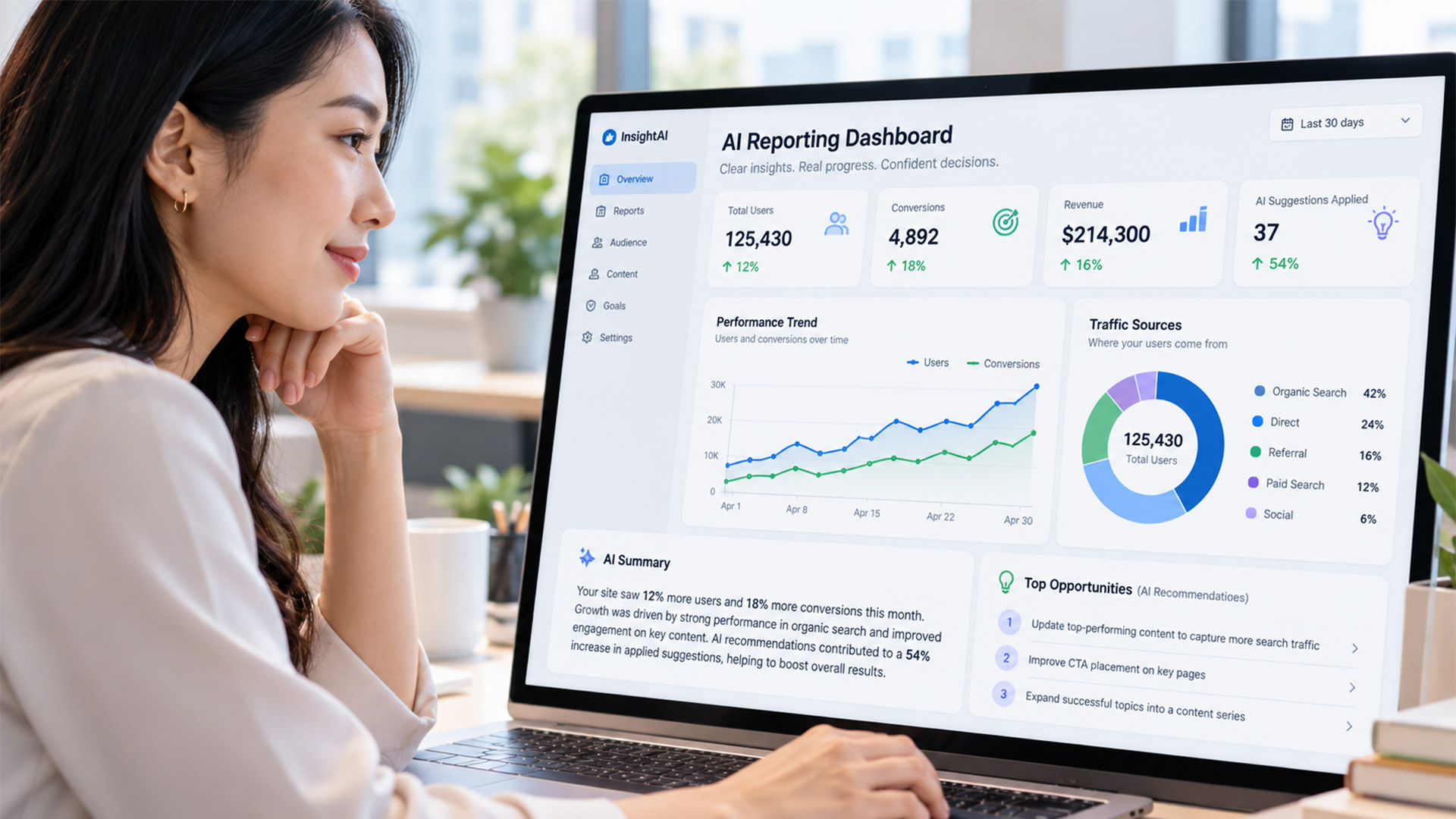
Bringing the principles together, an AI reporting dashboard people actually use tends to have a few things in common. It’s built around real business questions rather than every piece of available data. It explains important changes in plain language, uses a small number of meaningful metrics, and provides numbers people can trust. Most importantly, it’s easy to access and gives people the information they need without making them dig through charts to find it.
That’s the difference between a dashboard that simply reports data and one that actually helps a business make decisions.
Synqro’s AI Reporting Dashboard follows this approach by connecting a business’s existing sales, marketing, and operations data and turning it into a plain-language summary that can be reviewed in about fifteen minutes, rather than requiring users to interpret every chart themselves.
Frequently Asked Questions
Why do so many dashboards go unused even after a significant investment?
Research consistently points to the same root cause: dashboards get built around whatever data is available rather than the specific decisions someone actually needs to make weekly, so users stop finding them relevant and stop returning.
Does adding AI to a dashboard automatically make it more useful?
Not automatically. AI adds real value when it produces a plain-language interpretation and proactively flags anomalies, but a dashboard that simply displays the same charts with an AI label attached hasn’t actually changed what made the original version go unused.
How many metrics should a business dashboard actually track?
Fewer than most businesses assume. Three to five core metrics, checked consistently every week, tend to deliver more real value than a much broader dashboard that gets checked only occasionally.
What’s the fastest way to tell if a dashboard is actually being used?
Ask whoever it was built for to recall the last specific decision it influenced. A quick, confident answer suggests real use. Hesitation or a vague answer usually means it’s already drifted toward being ignored.
Can an old, abandoned dashboard be fixed, or does it need to be rebuilt?
It depends on the root cause. If the numbers themselves are trusted but the dashboard just isn’t answering the right questions, narrowing its focus can revive it. If trust in the underlying numbers has already broken down, a fresh rebuild with transparent, verified data sources is usually more effective than trying to repair the existing one.
Does a useful dashboard need to be checked on a computer, or does mobile matter?
Mobile access matters more than most businesses initially assume, particularly for owners without dedicated time set aside to review reports at a desk. A dashboard that only delivers its full value on a large screen tends to get checked far less consistently than one built to work quickly on a phone.
An AI reporting dashboard earns its place in a business the same way any tool does: by consistently answering a real question faster than the alternative. The technology behind it matters far less than whether it was built around an actual decision someone makes every week, stated in plain language, from numbers people have learned to trust. Get those three things right, and a dashboard becomes something people actually open. Get them wrong, and even the most sophisticated AI underneath won’t stop it from joining the 90% that quietly go unused. If your current reporting setup has drifted into that pattern, Synqro’s AI Reporting Dashboard is built specifically around the principles covered here. For a broader framework on evaluating reporting platforms generally, our guide on choosing an AI-powered reporting platform is a useful companion read.

