

What Is Retail Automation? A Complete Guide for Modern Retail Businesses

Key Takeaway
- What is retail automation, in plain terms? It’s the use of software and systems to run repetitive retail tasks without manual effort, from stock reordering to customer follow-ups.
- Retail automation is broader than AI. It includes rule-based systems like barcode scanners and POS software, alongside newer AI-driven tools.
- The retail automation market is growing fastest in Asia Pacific, driven partly by labour shortages and rising customer expectations.
- Automation spans five main areas: front-of-house, back-office, inventory and supply chain, marketing, and finance.
- Most shops get the best results starting with one process, not a full system overhaul.
Introduction
If you’ve ever tried to explain to a new hire exactly how stock gets reordered, how a customer complaint gets logged, or how end-of-day numbers get reconciled, you already know the honest answer: it’s usually a patchwork of habits, spreadsheets, and whoever remembered to do it last time. That patchwork works until it doesn’t, usually right when the shop is busiest.
Retail automation exists to replace that patchwork with something consistent. It’s a term that gets used loosely, sometimes to mean self-checkout machines, sometimes to mean AI chatbots, sometimes to mean an entire warehouse full of robots. This guide covers what retail automation actually is, the different forms it takes, how it differs from AI specifically, and where a small or mid-sized retail business should realistically start.
This is written for shop owners and operations managers, not for enterprise IT teams evaluating a seven-figure rollout. Everything here applies whether you run one outlet or five.
By the end, you should have a clear answer to what retail automation actually covers, how it differs from AI specifically, which category of automation is most likely to matter for a business your size, and a practical way to decide what to automate first without guessing.
What Is Retail Automation?

Retail automation is the use of software, and sometimes hardware, to carry out retail tasks that would otherwise require a person to do them manually, consistently, and without needing a reminder. That covers a wide range: a barcode scanner automating price lookup, a POS system automating end-of-day sales totals, a chatbot automating a customer reply, or a workflow tool automating a supplier reorder.
The common thread across all of these is removing a repetitive, rules-based task from a person’s plate so they can spend that time on something that actually needs human judgement, like serving a customer in front of them or deciding what to stock for the next season. It’s worth being clear that automation isn’t about replacing staff. In most SME retail settings, headcount stays the same. What changes is how that time gets spent, shifting away from repetitive administrative work and toward tasks a person is genuinely better suited for.
A Brief History of Retail Automation
Retail automation didn’t start with AI. Long before chatbots and predictive analytics, retailers were already using technology to make their businesses faster, more accurate, and easier to manage. Each wave of innovation solved a different problem, and today’s retail businesses often use a combination of them all.
- 1970s–1980s: Barcode scanners and electronic POS systems
The first major shift came with barcode scanners and electronic point-of-sale (POS) systems. Instead of manually entering prices or keeping paper ledgers, retailers could scan products instantly at checkout. This sped up transactions, reduced pricing mistakes, and gave businesses a much more reliable way to record sales. - 2000s–2010s: Smarter back-office operations
As software became more affordable, retailers began adopting inventory management systems, customer relationship management (CRM) platforms, and e-commerce solutions. Sales, stock levels, and customer information could finally be managed from connected systems instead of separate spreadsheets or manual records. During this period, loyalty programmes also started moving from paper punch cards to digital rewards, giving retailers a better way to engage repeat customers. - Today: AI-powered retail automation
The latest wave builds on everything that came before. Instead of simply following fixed rules, AI-powered tools can analyse sales trends, predict inventory demand, answer customer questions, generate business reports, and automate repetitive administrative tasks. Rather than replacing existing retail systems, AI makes them smarter by helping business owners make faster and more informed decisions.
Most retail businesses today don’t rely on just one generation of technology. A typical retailer may use a POS system for checkout, inventory software to manage stock, and AI tools to automate customer support or reporting. Modern retail automation is really the combination of all these technologies working together to save time, improve efficiency, and create a better shopping experience.
The Main Types of Retail Automation
Retail automation isn’t a single tool or software. It covers many different parts of running a retail business, from serving customers and managing inventory to marketing and reporting.
The best place to start depends on where your business spends the most time today. If your team is overwhelmed by customer enquiries, customer service automation may offer the biggest impact. If you’re constantly chasing stock levels or preparing reports, there are tools built specifically for those challenges.
Here are the five main types of retail automation.
1. Front-of-House Automation
This focuses on improving the customer experience by automating interactions that happen before, during, or after a purchase.
Common examples include:
- AI chatbots for customer enquiries
- WhatsApp automation
- Digital kiosks
- Self-checkout systems
- Online booking or appointment systems
- Queue management
For most SMEs, chatbots and messaging automation deliver far better value than expensive self-service kiosks.
Example:
A small electronics retailer uses an AI chatbot on WhatsApp to answer questions about product availability, opening hours, and warranties after business hours, helping customers without hiring additional staff.
2. Back-Office and Workflow Automation
Not every repetitive task happens on the shop floor. Many of the biggest time drains happen behind the scenes.
Back-office automation helps reduce manual work by connecting systems and automating routine administrative tasks such as:
- Invoice processing
- Purchase approvals
- Staff task assignments
- Internal notifications
- Document management
- Data synchronisation between business systems
Example:
When a store manager submits a purchase request, it’s automatically sent to the right approver, who receives a notification immediately instead of discovering it days later in their inbox.
3. Inventory and Supply Chain Automation
Inventory is one of the biggest operational challenges for retailers. Too much stock ties up cash, while too little stock leads to missed sales.
Automation helps retailers monitor inventory in real time by:
- Tracking stock levels automatically
- Creating low-stock alerts
- Triggering purchase orders
- Forecasting future demand
- Monitoring supplier performance
Large retailers may also automate warehouse picking and fulfilment, but most SMEs benefit simply from knowing exactly when products need to be reordered.
Example:
A convenience store automatically sends a reorder request to its supplier whenever one of its bestselling products reaches a predefined stock level, reducing stock-outs without daily manual checks.
4. Marketing and Customer Engagement Automation
Finding a new customer is often more expensive than keeping an existing one. Marketing automation helps retailers stay connected with customers without manually sending messages every day.
Common automations include:
- Loyalty and rewards programmes
- Automated review requests
- Birthday promotions
- Re-engagement campaigns
- Personalised offers based on previous purchases
- Membership reminders
Example:
A beauty salon automatically sends a promotion to customers who haven’t visited in the past month, encouraging repeat appointments without any manual follow-up.
5. Financial and Reporting Automation
Many retail owners spend hours every week preparing reports instead of analysing them. Reporting automation collects information from multiple systems and turns it into useful business insights.
This may include:
- Daily or weekly sales reports
- Expense tracking
- Profit summaries
- Performance dashboards
- AI-generated business reports written in plain English
For many SME retailers, this is one of the quickest ways to save time because reporting becomes automatic instead of being built manually from spreadsheets.
Example:
Instead of combining sales data from two stores every Monday morning, a retailer receives an AI-generated report summarising revenue, top-selling products, low-performing categories, and inventory trends before the workday even begins.
How Synqro Approaches Retail Automation
Retail automation doesn’t have to mean replacing the systems you already use. In many cases, the biggest improvements come from connecting existing tools and automating repetitive processes that consume time every day. That’s the philosophy behind Synqro’s retail automation solutions. Instead of offering another standalone platform, Synqro helps retailers streamline workflows, automate routine operations, and turn business data into actionable insights.
For example, AI workflow automation helps businesses automate repetitive operational tasks such as customer follow-ups, appointment reminders, invoicing, internal approvals, and data transfers between different business systems. On the reporting side, the AI reporting dashboard brings together data from sales, marketing, and operations into one place, automatically generating easy-to-understand reports that highlight trends, unusual activity, and opportunities that may require attention. Both solutions are designed specifically for SMEs, integrate with the software retailers already use, and require little technical expertise to manage. If you’d like to explore these and Synqro’s other retail AI solutions in more detail, we’ve covered them in a dedicated guide.
Also Read: A Retail Business Owner’s Honest Guide to the Right AI Tools.
Common Retail Processes Worth Automating First
If you’re just starting with retail automation, you don’t need to automate everything at once. The best approach is to begin with repetitive, time-consuming tasks that happen every day or every week. These processes usually deliver the quickest return on investment because they save staff time, reduce manual errors, and keep your business running more efficiently.
Some of the best places to start include the following:
- Weekly sales and inventory reporting so you no longer spend hours compiling spreadsheets and analysing sales data.
- Inventory and restock alerts to ensure popular products are reordered before they run out, reducing missed sales opportunities.
- Invoice generation and payment reminders to improve cash flow and reduce the risk of overdue payments.
- Customer re-engagement campaigns that automatically reach out to customers who haven’t visited or purchased in a while.
- After-hours customer enquiries using AI chatbots or automated messaging, so potential customers receive immediate responses even when your store is closed.
On the other hand, not every process should be automated immediately. Tasks that require human judgement, creativity, or personalised decision-making often benefit from a hands-on approach. For example, handling a complex customer complaint, negotiating with a supplier, or deciding on a one-off promotional campaign usually requires context that automation can’t fully understand.
As a general rule, automation works best for tasks that follow the same process every time. Once those repetitive activities are running smoothly, you can gradually introduce automation into more areas of your retail business.
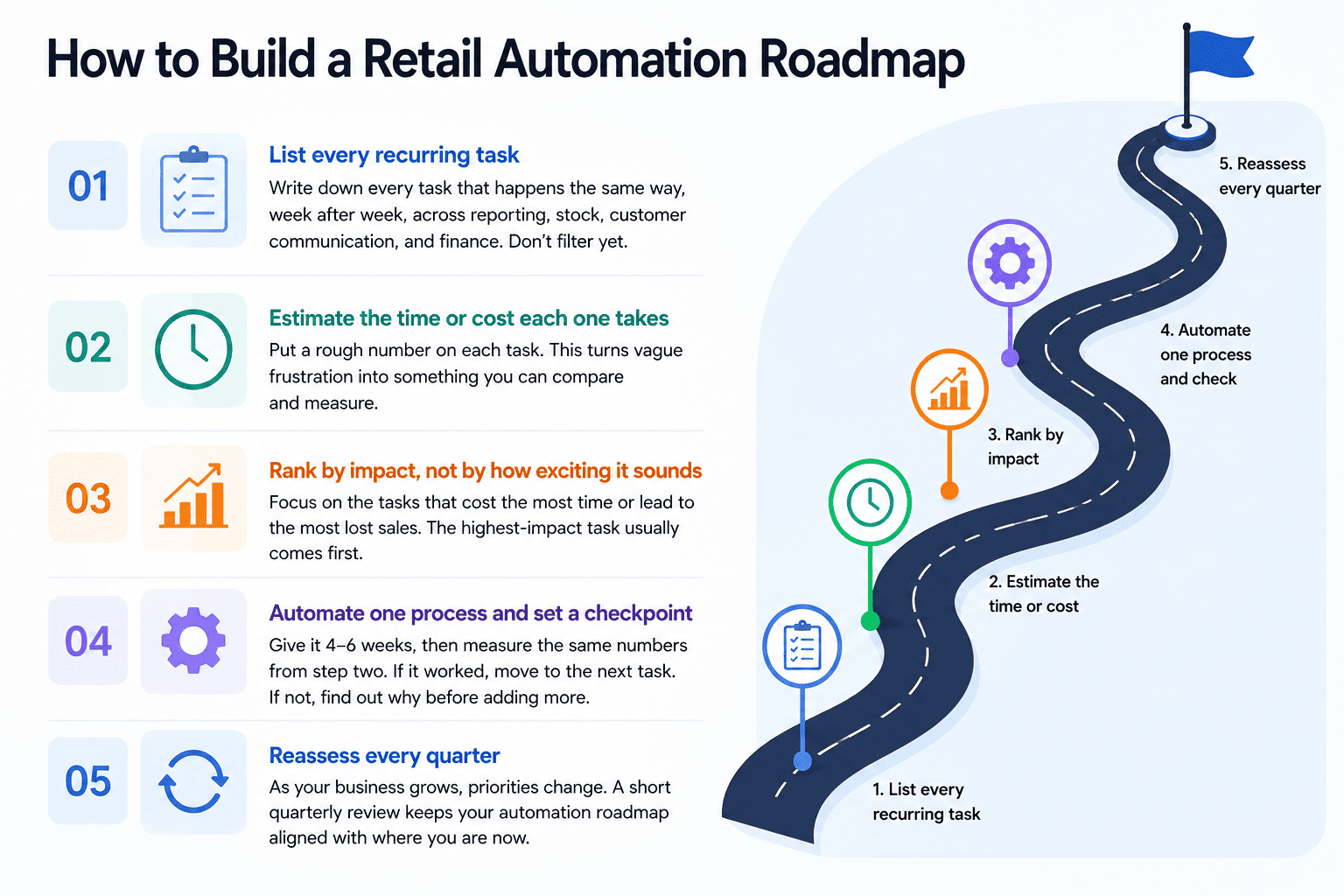
How to Build a Retail Automation Roadmap
One of the biggest mistakes retailers make is buying an automation tool before identifying the problem they want to solve. A better approach is to start with your business processes first, then choose technology that addresses your biggest pain points. A simple roadmap helps you prioritise the right projects, measure their impact, and avoid paying for tools that never get used.
Step 1: List Your Recurring Tasks
Start by writing down every task your team performs on a regular basis. Include activities across inventory management, reporting, customer communication, finance, marketing, and operations. Don’t worry about whether they can be automated yet, just create a complete list.
Step 2: Estimate the Time or Cost
For each task, estimate how much time or money it consumes. This doesn’t need to be exact. It could be:
- Three hours every Monday preparing sales reports.
- Five hours each week following up on customer enquiries.
- One stock-out every month on a bestselling product.
Putting numbers against each task makes it much easier to identify where automation will have the biggest impact.
Step 3: Prioritise by Business Impact
Rather than choosing the newest or most exciting AI tool, focus on the processes costing you the most time, money, or lost sales. Solving one high-impact problem usually delivers far more value than automating several smaller ones.
Step 4: Automate One Process at a Time
Start with a single workflow and give it four to six weeks. Measure the same metrics you identified earlier to see whether you’ve reduced manual work, improved response times, or increased efficiency. Once it’s delivering results, move on to the next priority.
Step 5: Review Your Roadmap Regularly
As your business grows, your priorities will change. A process that saved the most time when you had one store may no longer be your biggest challenge after opening multiple outlets. Reviewing your automation roadmap every quarter helps ensure you’re always investing in the areas that deliver the greatest return.
What Retail Automation Costs and How Long It Takes
One of the biggest misconceptions about retail automation is that it’s only affordable for large retailers. While hardware such as self-checkout kiosks or warehouse robotics can require a significant upfront investment, many of today’s automation tools are cloud-based and available through affordable monthly subscriptions, making them accessible to SMEs.
The actual cost depends on what you’re trying to automate. Simple tools like AI chatbots, workflow automation, reporting dashboards, or loyalty platforms are generally quicker to implement and require little or no new hardware. More complex projects involving multiple business systems, custom integrations, or physical automation naturally require a larger investment.
Implementation timelines also vary depending on the scope of the project.
- Simple software automation: Usually 1–4 weeks
- Multiple workflows or system integrations: Around 1–3 months
- Large enterprise automation projects: Several months or longer
In general, the less custom development a solution requires, the faster and more affordable it will be. Solutions designed specifically for retail businesses can often be configured much more quickly because they already understand common retail workflows such as inventory management, customer loyalty programmes, reporting, and purchase approvals.
This shift towards software-first automation is reflected across the industry. According to the Mordor Intelligence Retail Automation Market Report, the global retail automation market is expected to exceed USD 26.13 billion in 2026 and grow to USD 46.83 billion by 2031. The report also notes that software and managed services are growing faster than hardware investments, as retailers increasingly favour cloud-based subscription models over large upfront capital expenditure. It further identifies the Asia-Pacific region as the fastest-growing market, driven by digital transformation, labour shortages, and growing demand for better customer experiences.
Retail Automation by Business Size
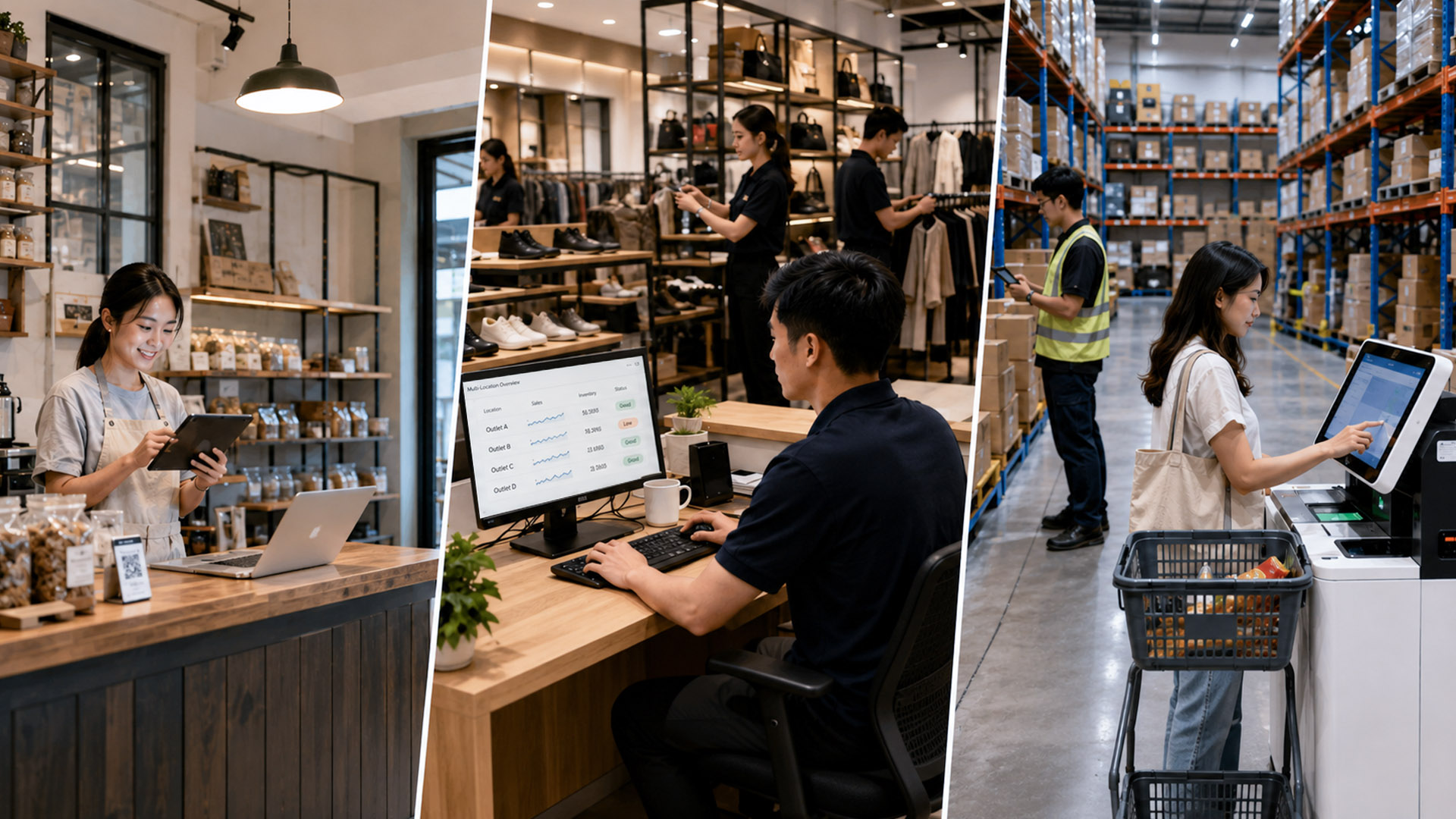
The best automation strategy depends on the size of your business. A single-outlet retailer has very different priorities from a chain operating multiple stores. While the goal is always to save time and improve efficiency, the type of automation that delivers the biggest return changes as your business grows.
-
Small Retail Businesses (1 Outlet | Up to 10 Staff)
If you’re running a single store, start small. Focus on software that removes repetitive manual work rather than investing in expensive hardware.
Priorities:
-
- Automate customer enquiries with an AI chatbot.
- Generate sales and inventory reports automatically.
- Set up low-stock alerts and customer review requests.
At this stage, affordable cloud-based tools usually deliver a much higher return than self-checkout kiosks or other hardware investments.
-
Growing Retail Businesses (2–5 Outlets | 10–50 Staff)
As your business expands, managing multiple locations becomes the biggest challenge. Information often sits in different systems, approvals take longer, and reporting becomes increasingly time-consuming.
Priorities:
-
- Connect inventory, POS, and business systems.
- Automate approvals, invoicing, and internal workflows.
- Consolidate reporting across all outlets into one dashboard.
Workflow automation becomes much more valuable because it keeps multiple stores operating consistently without adding administrative overhead.
-
Large Retail Businesses (Multiple Outlets | 50+ Staff)
Larger retailers deal with higher transaction volumes, more employees, and more complex operations. At this stage, both software and hardware automation can deliver significant efficiency gains.
Priorities:
-
- Introduce self-checkout or smart POS technologies.
- Automate warehouse and inventory operations.
- Use AI to forecast demand and optimise stock across locations.
These investments typically require a larger budget but become worthwhile once transaction volumes justify the cost.
Common Mistakes When Implementing Retail Automation
Retail automation doesn’t fail because the technology is bad. More often, it fails because businesses rush the implementation or automate the wrong processes. Avoiding a few common mistakes can make the difference between a successful automation project and an expensive subscription that nobody uses.
1. Automating a Broken Process
Automation should improve an existing process, not fix one that’s already broken. If your inventory management, approval workflow, or reporting process lacks clear rules, automating it will only make those inefficiencies happen faster. Before introducing any automation, take the time to standardise the process and remove unnecessary steps.
2. Not Measuring Success Before You Start
Many retailers begin automating without knowing how much time or money they’re actually trying to save. Without a baseline, it’s difficult to measure whether the new system is delivering value. Recording simple metrics such as reporting hours, customer response times, or inventory errors before implementation makes it much easier to demonstrate a clear return on investment later.
3. Trying to Automate Everything at Once
Rolling out multiple automation projects simultaneously can overwhelm a small team. Employees need time to learn new workflows and build confidence in the system before relying on it completely. Starting with one high-impact process, measuring the results, and expanding gradually usually leads to stronger adoption and better long-term outcomes.
4. Choosing Tools That Don’t Work Together
The best automation solutions fit into your existing technology stack rather than creating more manual work. If a new platform can’t integrate with your POS system, inventory software, or accounting tools, your team may end up transferring data manually between systems. Before investing, make sure the solution can connect with the software your business already depends on.
5. Treating Automation as a One-Time Project
Automation isn’t something you set up once and forget about. As your business grows, customer demand changes, and new products are introduced, your workflows will need to evolve too. Reviewing your automations every few months helps ensure they continue supporting your operations and identifies new opportunities to improve efficiency.
The most successful retailers don’t aim to automate everything. They focus on solving the right problems first, measure the results, and continuously refine their processes as the business grows.
Frequently Asked Questions
What is retail automation in the simplest terms?
Retail automation is software, and sometimes hardware, that carries out repetitive retail tasks, like stock reordering, invoicing, or customer replies, without a person doing each step manually every time.
Do I need AI to start with retail automation?
No. Some of the most useful early automation, like automated invoicing or scheduled reminders, is rule-based rather than AI-driven. AI becomes more valuable for tasks involving natural language or prediction, like chat and forecasting.
How much does retail automation typically cost for a small shop?
Software-based automation is usually priced as a monthly subscription rather than a large upfront cost, with pricing generally scoped around which processes and how many outlets are involved.
Which retail process should I automate first?
Weekly reporting, restock alerts, and invoicing tend to deliver the fastest, most measurable payoff since they’re repetitive and don’t require much situational judgement.
How long does it take to implement retail automation?
Most SME-focused software tools go live within one to four weeks. Larger, more customised projects spanning multiple systems typically take longer.
Does retail automation make sense for a single-outlet shop or only chains?
It makes sense for both, but the right starting point differs. A single outlet usually benefits most from software like chat, reviews, or reporting, while multi-outlet businesses tend to see the biggest gains from workflow automation that coordinates processes across locations.
Conclusion
Retail automation isn’t a single product you buy once and finish with. It’s a spectrum, from a decades-old barcode scanner to a modern AI chatbot, and most shops end up using a mix of both ends of that spectrum rather than picking one. The businesses that get the most out of it don’t try to automate everything in one go. They map out which process is costing them the most time or the most sales right now, automate that one properly, and build from there once it’s working.
That process doesn’t need to be complicated. Go back to the roadmap outlined above: list the recurring tasks, estimate what each one is actually costing, rank them honestly, and commit to one before moving to the next. Shops that follow that order tend to end up with automation that actually gets used, rather than a pile of unused subscriptions and a vague sense that something should have worked better than it did. If back-office workflows or weekly reporting are where your shop loses the most time, Synqro’s AI Workflow Automation and AI Reporting Dashboard are built around exactly those problems. You can also browse the Synqro blog for more practical guides like this one.

